Display Price With Selling Plan Discount
There currently is the option to use dynamic data and use ‘Display Price Without Selling Plan Discount’ but not the other way around ‘Display Price With Selling Plan Discount’.
This causes issues when displaying the price of different selling plans as dynamic data.
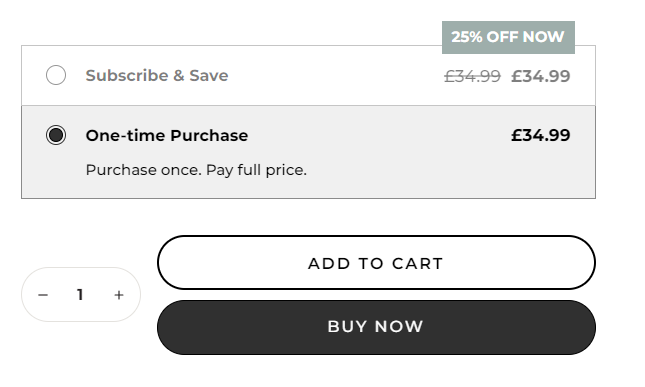
For example if I have 2 prices on my product page - ‘Display Price Without Selling Plan Discount’ for my one-time purchase option and ‘Display Price’ for my subscription option.
The discounted selling plan (subscription) will keep showing the price of the selling plan currently selected by the customer, so will show without discount. See attached example.
Comments4
Noah Gilmore
Jul 29, 2025
We now have the ability to use a specific selling plan to apply a discount to dynamic prices in Replo. Check this out by selecting “apply selling plan discount” in dynamic data settings, then selecting the selling plan you want to discount by from there. This should enable the case we’re talking about in this screenshot!
An Anonymous User
Apr 21, 2025
Really Unhappy with this. I think they should fix this issue.
Shakilo AM
Feb 26, 2025
Super important feature, not sure why this hasn’t been implemented already. It really messes with the customer experience, losing trust - decreasing conversions. Please look into this asap.
Anonymous User
Sep 23, 2024
10000% this.